Permits Portal · Live this burn season
Sell burn permits online. Stop selling them at the front counter.
Residents buy a burn permit from their phone in minutes. Your duty staff see every active permit, and today's burn status, on one board. Nobody has to staff the counter for a $13 permit.
Burn permits are where we started, because every district we know sells them and most still do it on paper. But the portal sells whatever your district needs to sell, and burn permits are just the first thing on it.
or email support@stationworks.io
For your residents.
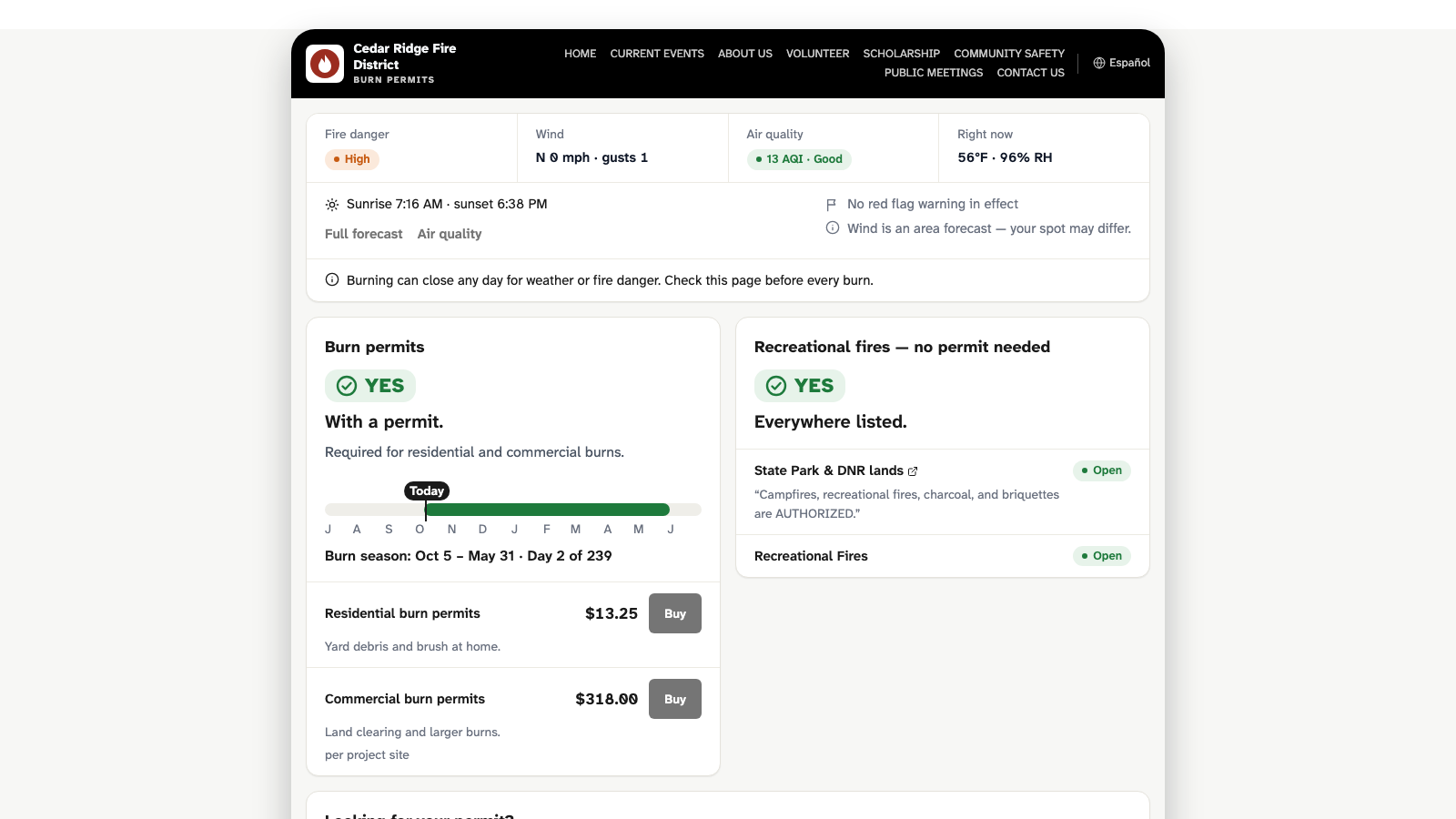
A page with your district's name on it. No account to create and no password to forget: four questions and the payment, on any phone.
The right permit, at the right address.
Residents see the permits you offer, what each one covers, and what it costs. Their address is checked against your district boundaries and any no-burn zones before they pay, so you're not refunding permits you should never have sold.
Whether they can burn today.
Fire danger, wind, and air quality show at the top of the page. When there's a burn ban, sales pause and the page says so, so your phone doesn't ring with the question.
A permit that stays current.
The permit isn't a receipt. It's a link the resident keeps, and it shows today's burn status every time they open it. Lost it? They enter their email address and get it again, without calling you.
Paid by card, on the spot.
Payment runs through Stripe. Nobody mails a check or drops cash at the station.
For your duty staff.
When a caller reports smoke, the answer to "is that a permitted burn?" is one look away.
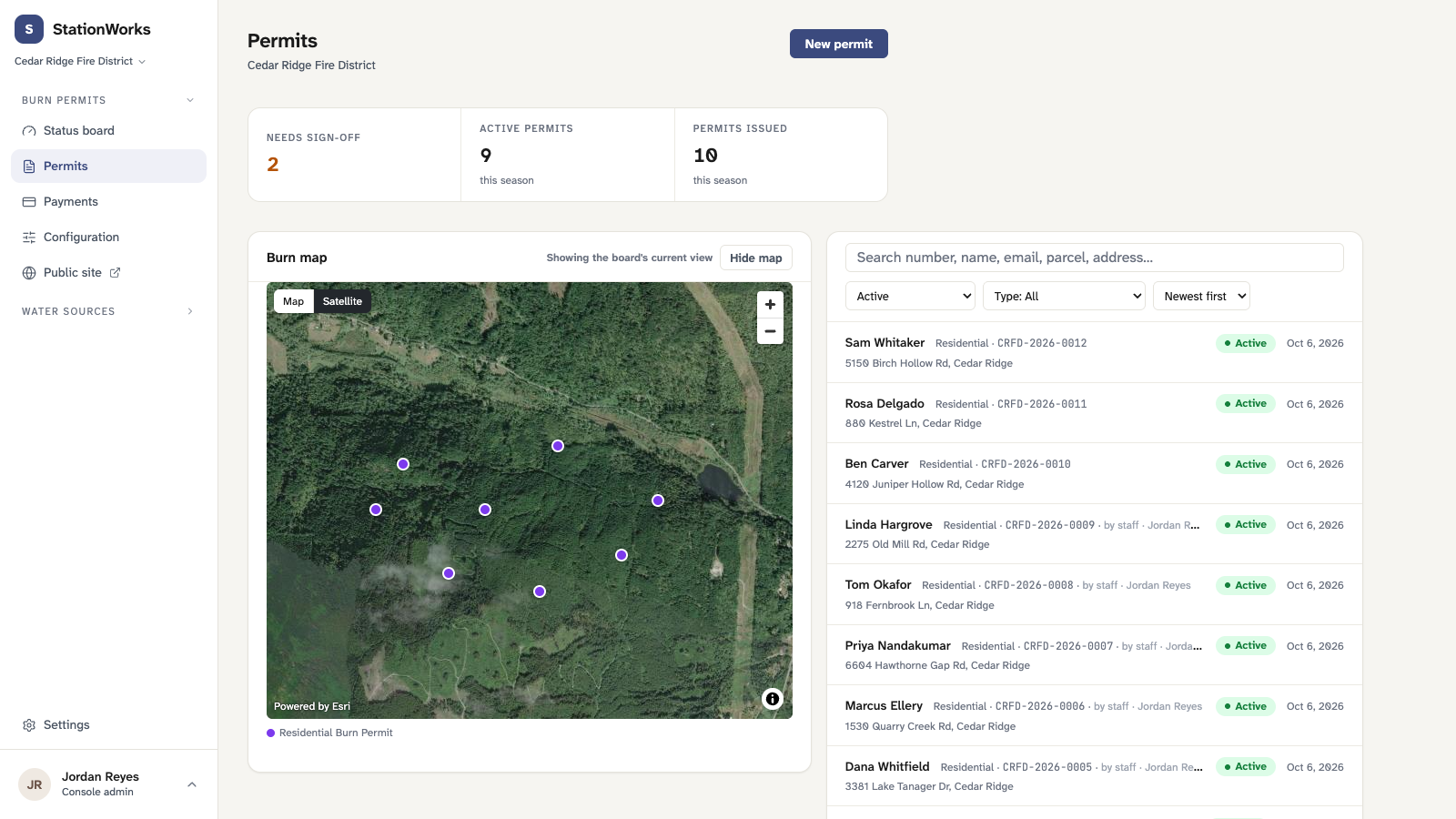
Every active permit on one board.
A live map of who's permitted to burn today, and where. No binder, no spreadsheet, no calling the office.
The history at the address.
Past NERIS incidents at a permit's address show alongside it, so staff know which piles have gotten away before.
Inspections before the permit.
Require a site inspection where you need one, like a commercial pile, and approve it before the permit issues. Skip it where you don't.
Sign in with the account they already have.
Staff use their district's Microsoft or Google accounts. There's no new password to manage.
For your district.
It's your permit program. The portal runs it the way you already do.
Your permit types and your prices.
Residential, commercial, agricultural, fireworks, or whatever else your district issues. Set what each one costs, add new kinds, retire old ones.
Your boundaries and your season.
Sell only inside your district. Set the season dates, and move them when the weather moves them.
One click to change the burn status.
Call a burn ban once, and the resident page, every permit, and the staff board all say so at the same moment.
The other agencies' status, too.
Where DNR, the National Park Service, or BLM set burn restrictions that reach your district, the portal brings them in, so residents get one answer.
What it costs.
Residents pay for their permit. Your district pays a one-time setup fee, an annual subscription, and a small fee on each sale; you decide whether to pass that fee on to residents or absorb it. Every record is yours, and you can export all of it any time.
We'll walk you through the numbers for your district. If you're on the board, here's what you're paying for.
Get your district's portal up before the next season.
Email us at support@stationworks.io, and we'll walk you through it and set it up with you.